All your rides in one place

Kacper Goliński Kacper Goliński · Comments

Bring your riding history into VeloPlanner, then see every road you've ridden on your own heatmap, your year at a glance and all your activities on one map.
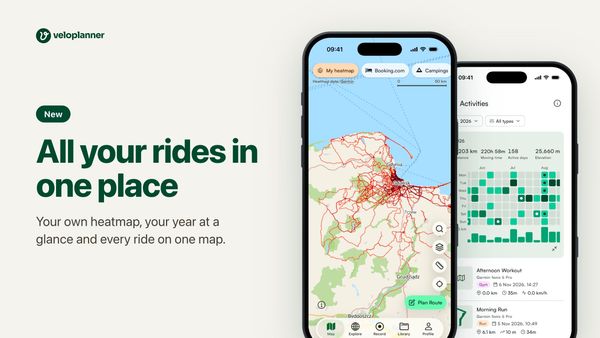
All your rides in one place. Your own heatmap, your year at a glance and every ride on one map. Two phones show the VeloPlanner app: a heatmap of rides around Gdańsk, and a calendar of the year's active days.
In this article

Years of rides usually sit in another app or on a bike computer. Now they can live next to your routes: bring them in once, and VeloPlanner shows you where you've been.

My heatmap: a personal heatmap of your rides, in the app and on the web

Turn on My heatmap on any map, in the app or on the website. Roads you ride often show darker, so you see your favourites at a glance, and the gaps where you've never been. Handy when you plan something new.

Two phones with the VeloPlanner app. On the first, My heatmap is on and the map shows a rider's activities around Gdańsk as a red heatmap, darkest in the city. On the second, the heatmap settings: four colours, an opacity slider and activity types
① Turn on My heatmap on any map. In its settings, ② pick a colour ③ and fade it to see the map beneath.

Make it yours: pick a colour, fade it to see more of the map, and show only some activity types or dates, like this year's rides alone.

The heatmap settings scrolled to the activity types, all ticked, and Dates set to This year. Next to it, the same map with this year's activities only, drawn in blue
① Show only some activity types, ② or only some dates. Here: this year, in Ice.

Activity calendar and yearly stats, in the app and on the web

Activities in the app, in your profile and your library, now opens with your year: distance, moving time, active days and climbing, above a calendar of every day you were out. Tap the calendar to open it big, with a bar for each week.

Activities in the VeloPlanner app for 2026: 3,203 km, 158 active days and 25,660 m of elevation, above a small calendar of the year. On the second phone the calendar is opened big, with a square for each day and a bar for each week
① This year's totals, over a calendar of the days you were out. ② Opened big, it shows a bar for every week.

Tap a day, a week or a month to see just those activities. Or switch the period to All for your all-time totals and a bar for every year.

A week picked in the calendar, July 27 to August 2: 203 km on 6 active days, with that week's activities listed below. On the second phone the period is All: 36,930 km all-time and a bar for each year from 2017 to 2026
① Tap a week to see its totals and activities. ② Switch the period to All ③ for a bar per year.

The website has the same calendar, on your dashboard and in My activities.

The My activities card on the VeloPlanner dashboard: pickers for the year and activity types, the year's distance, moving time, active days and elevation gain, and a calendar with a square for each day and a bar for each week
① Pick a year and activity types. ② Your totals for them. ③ Click a day, a week or a month to open those activities.

Activity calendar widget for the iPhone home screen

Add the Activity calendar widget, and this month's distance, time and active days are there every time you pick up your phone. It comes in two sizes, on iPhone.

An iPhone home screen with two VeloPlanner widgets. Both show the month's distance and a calendar with the active days in green; the wider one also shows the time ridden
The Activity calendar widget in its two sizes.

Activities map: all your rides on one map, with filters (web)

On the website, the Map button in My activities puts all your activities on one map. Filter them by type, date, distance or name, and choose how the lines look.

The activities map on the VeloPlanner website: hundreds of rides drawn as red lines across Pomerania, densest around Gdańsk, with a list of the rides in view on the left, 558 of 1161
① The rides in view, out of all of them. ② The list follows the map. ③ Choose the lines' colour, width and opacity.

Looking for one ride? Move the map to where it was. The list keeps to the activities in view, and a click opens the one you want.

The activities map moved to south-east Sweden. The list shows the 2 rides there, out of 1161. One is picked: a 99.2 km ride from Karlskrona to Kalmar and Öland, drawn on the map with a card of its date, distance, time and climbing
① Move the map and the list keeps to what's in view: here, two days in Sweden. ② Pick a ride ③ to see it with its details.

Import activities from Garmin, Hammerhead, Strava and other apps

All of this works with the rides you record in the app. To add the rest, there are two ways, both on the website:

  • Upload your history. On Upload activities, drop FIT, GPX or TCX files, or the whole export from Strava, Garmin, Komoot or another app. Step-by-step guides show how to get that export.
  • Connect your device. In Connected apps, connect Garmin or Hammerhead, and every new activity arrives by itself.
The Upload activities page: buttons for guides to Strava, Garmin and another app, a choice between public and private for the imported activities, and an area to drop FIT, GPX or TCX files and zips of them
① Guides for getting your export out of Strava, Garmin or another app. ② Choose who sees the activities, ③ then drop the files.

Hammerhead brings your history along when you connect. Garmin sends the past month: for everything older, request your export from Garmin and upload it once. After that, new rides keep coming on their own.

Garmin Connect in Connected apps, shown as connected, with what Garmin shares: activities, past activities and routes. Below, a note that Garmin sends activities from the past month, and an Import Garmin history button
① What Garmin shares with VeloPlanner. ② New activities come by themselves, from the past month on. ③ Older ones come in with your Garmin export.

Wahoo is next: its sync is in testing, and we're waiting for Wahoo's final confirmation.

Runs, swims and gym sessions come in too, each marked with its type. You choose whether imported activities are public or private, and they show up in the app as well. The heatmap and the year view need version 2.10 of the app.

Bring your rides in, then turn on your heatmap.

About the author

Kacper Goliński
Kacper Goliński

Founder of VeloPlanner. Cycling enthusiast.

Share:

Comments

Join the conversation

Log in or create a free account to comment on this article and reply to other riders.

Log in to comment

Log in to like this post